


Mangazone : Manga & Comics
0.00.00 Reviews
App Specs
- Version
- 1.0.0
- Updated On
- License
- Free
- Downloads
- 10,000+
- Developer
- GoldenDev Studio
- Categories
- Comics
- Platform
- Android
Screenshots
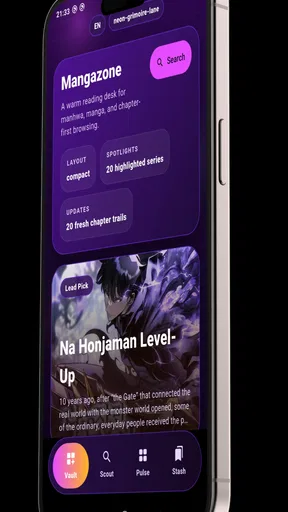
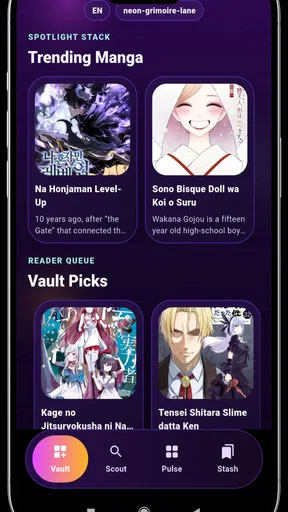
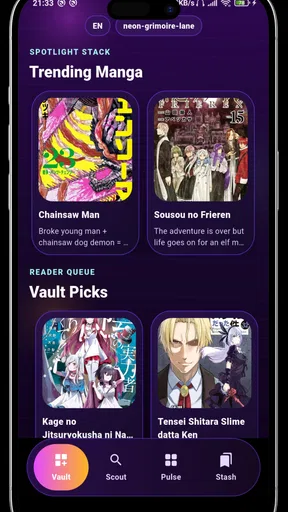
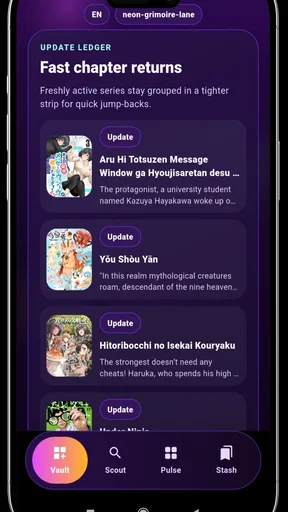
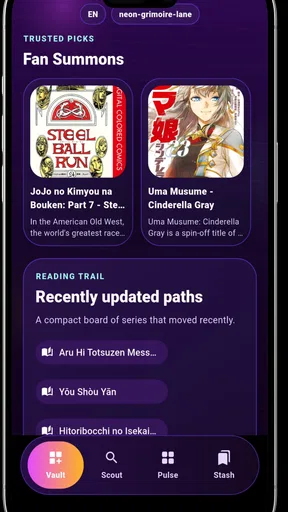
 Analysis by AppCompare
I approached Mangazone: Manga & Comics as someone looking for a straightforward way to read illustrated stories on a phone, not as a replacement for every dedicated comic service. Its appeal is easy to understand: it brings manga, comics, manhwa, and webtoon reading into one app, with an emphasis on getting to the page quickly. In my experience, that makes it most interesting for casual readers who want a simple starting point rather than a complicated reading platform.
The app is developed by GoldenDev Studio and is available free of charge for everyone. It belongs to the comics category, runs on devices using Android 7.0 or later, and currently sits at version 1.0.0. It has passed the ten-thousand-install mark, which suggests that it has already attracted an early audience while still feeling like a relatively young product. That combination matters: the basic idea is approachable, but readers should also expect a less mature experience than they might find in a long-established comic ecosystem.
Getting past the first points of friction
The first place I would expect readers to get stuck is not the reading itself, but deciding what to do after opening the app. A broad comics reader can sound convenient, yet several formats do not always behave the same way. A traditional manga page, a vertically scrolling webtoon, and a standard comic page each need a different reading rhythm. If the opening screen presents these together, a new user may need a moment to understand whether the app is meant for browsing, searching, or immediately continuing a title.
My practical advice is to begin with one short reading session instead of trying to organize an entire library at once. Open a title, check how its pages move, and pay attention to whether the reading direction feels natural. Manga often rewards deliberate page-by-page movement, while webtoon panels are easier to follow with a steady vertical scroll. This small test tells you more about whether the app suits your habits than a long browsing session does.
Another likely sticking point is source and title availability. The store summary presents Mangazone as a reader for several kinds of illustrated content, but that does not mean every series a reader knows will appear in the same way. I would avoid assuming that a title found in one format will automatically have the same chapters, presentation, or reading flow in another. If a favorite series is the main reason for installing it, checking that title early is a sensible first step.
That is especially important for readers who are moving from a service built around a fixed catalog. Dedicated manga or webtoon platforms usually make their available series and release structure very clear. A general reader can feel more flexible, but it may require more patience from the user when browsing. I see Mangazone as better suited to exploration and casual reading than to someone who needs a carefully managed official collection for a particular publisher or series.
A calm setup makes the first session easier
Because the app supports Android 7.0 and later, compatibility should be fairly broad for older phones as well as newer ones. Still, I would start with the ordinary checks that prevent many false alarms: make sure the operating system is supported, leave enough free storage for normal app operation, and use a stable connection while opening content for the first time. These are simple steps, but they are more useful than immediately blaming the reader when pages take a while to appear.
Worth Reading Before You Choose

Switching to Android Auto Means Rethinking Your Driving Routine

Google Calendar Makes a Crowded Week Easier to Manage

Baby Panda World Brings Quick Play to Modern Phones, but Its Game Library Feels Busy

ESPN’s Live Game View Makes Following Close Games Easier

QuizzLand Review: A Good Fit for Short Trivia Breaks, Not Every Player

Basketball Stars: Multiplayer Is Fast, but Can It Recover When Matches Go Wrong?
I also recommend closing demanding apps before a long reading session on an older device. Comics are visually dense, and switching repeatedly between a reader, a browser, and messaging apps can make a modest phone feel slower than it really is. If the first few pages load normally but later navigation becomes sluggish, reducing the number of open apps is a reasonable test before changing anything more drastic.
Version awareness is worth keeping in mind too. The current release is version 1.0.0, so I would treat the app as an early-stage reader and keep expectations realistic around polish. A first release can be perfectly usable while still having rough edges in navigation or content handling. If something behaves inconsistently, restarting the app and checking whether an update is available are safer first moves than repeatedly reinstalling it.
There is also a useful distinction between installation trouble and reading trouble. If the app will not install, the issue may relate to device compatibility, available space, or the app store process. If it installs but a particular title does not open correctly, the problem may be tied to that content or to the connection at that moment. Separating those situations saves time and prevents a reader from wiping the whole app when only one item needs another attempt.
Building a reading routine that does not become frustrating
My preferred way to use a general reader like this is in small, repeatable sessions. I would choose a title, read a few chapters or sections, and then leave the app rather than constantly jumping between many series. This keeps the experience focused and makes it easier to notice whether the app remembers where I stopped. If your reading habit depends on returning to several stories every day, a quick note of the last chapter can be a useful backup while you learn how reliable the app’s own navigation feels.
That suggestion may sound basic, but it addresses a real trade-off. A broad reader encourages discovery, while a large personal queue can make it harder to remember what you were reading. I find the app more comfortable when treated as a focused reading tool instead of an attempt to recreate a complete library-management system. Readers who enjoy switching among many long-running series may prefer a platform with more visibly developed collection controls.
For manga, I would read in a setting where I can hold the phone steadily and avoid frequent interruptions. Page-based stories can lose their impact when I am constantly changing orientation or jumping out to another app. For webtoons, I would use a slower scroll and pause between major panels rather than rushing through the entire screen. These habits are not special settings, but they make the same reader feel much more comfortable across different formats.
One of the more useful practical insights is to judge navigation separately from catalog breadth. A reader can offer many kinds of comics and still be inconvenient if returning to a paused story takes too many steps. During my first sessions, I would deliberately leave a title, browse elsewhere, and then try to return to it. That test reveals whether the app fits your actual routine better than simply counting how many genres appear on the screen.
I would also avoid judging image quality from a single slow opening. A weak connection can make pages appear less sharp or take longer to load, even when the underlying content is fine. Try the same title again under steadier network conditions before deciding that the reader itself is the problem. If only one series remains troublesome while other pages behave normally, the issue is more likely specific to that item than to the entire application.
Recovering when a chapter or page does not behave
When a page stops loading, my recovery process is deliberately simple. I first wait briefly, then move back and open the chapter again. If that does not help, I close and relaunch the app, check the connection, and try another title. Testing a second title is important because it tells me whether I am facing a general app problem or a problem limited to one piece of content.
If the app opens but appears to lose my place, I would avoid repeatedly tapping through pages at random. Instead, I would return to the title and locate the last section manually, making a note of the chapter for the next attempt. This is less convenient than a flawless resume function, but it prevents accidental skips and gives a clearer picture of whether the issue is repeatable.
Reinstalling should be a later step, not the first response. It can remove local app state and make it harder to recover a reading position, so I would only consider it after restarting, checking the connection, and testing multiple titles. The same applies to clearing app data: it may solve a damaged local state, but it can also erase local preferences or progress. A careful reader should treat it as a reset rather than a harmless refresh.
There is a difference between a page that is slow and a page that is unavailable. Slow loading may improve after reconnecting or waiting, while a missing chapter may remain unavailable no matter how many times it is opened. Repeating the same action over and over rarely helps the second situation. I would move to another chapter or title, then return later, rather than letting one failed page ruin the entire reading session.
Readers using older phones should also watch for memory pressure. If the app closes when several other apps are open, I would restart the phone or close background applications before concluding that Mangazone is unstable. If it closes consistently during the same action even after a clean restart, that is a stronger sign of an app-level issue. This kind of pattern-based checking is much more reliable than judging from one isolated crash.
When the reader is not really the cause
Not every frustrating session points to the application. Network congestion, an unreliable home connection, a weak mobile signal, or a busy device can all affect a comics reader. The best comparison is simple: try another title, then try again at a different time or on a more dependable connection. If the behavior changes, the surrounding setup deserves attention before the app is blamed.
Screen comfort can also be mistaken for a software problem. A bright display, tiny text, or frequent zooming may make reading feel poor even when page navigation works correctly. I would adjust the phone’s brightness and text viewing habits before deciding whether the reader is unsuitable. Manga and comics rely on fine artwork, so comfort depends as much on the physical device and environment as on the app.
Content expectations are another source of disappointment. A free general comics app may be attractive to someone who wants to sample different formats, but it is not automatically the best choice for a reader who needs a specific official release schedule, a carefully curated publisher catalog, or a deeply organized collection. In those cases, a dedicated service may be worth choosing even if it feels narrower, because its specialization can reduce browsing and availability surprises.
Parents should still use ordinary judgment despite the Everyone age rating. A broad comics category can contain very different storytelling styles, and an age label does not replace checking what a child is actually reading. For an adult reader, the rating mainly signals that the app itself is presented for a general audience; it does not mean every possible story has the same tone or themes.
Who will enjoy it, and who should choose something else
I think Mangazone is a reasonable fit for someone who wants a free entry point into manga, comics, manhwa, and webtoons without committing to a specialized service immediately. It is also useful for readers who like comparing formats: the same phone can serve as a page-based manga reader one evening and a vertical webtoon reader the next. The low barrier to entry makes experimentation easy.
A realistic use case would be a commuter who has a few spare minutes between errands. I would open one series, read a short section, and stop at a natural break instead of trying to manage a large queue. In that situation, the app’s value comes from convenience and variety. It does not need to become the center of my entire reading life to be worthwhile.
I would be more cautious about recommending it as the only reader for a serious collector. Someone who wants dependable organization across many titles, a highly polished reading history, or a formal home for a long-term library may find a mature dedicated platform more comfortable. Likewise, if your favorite series is unavailable or difficult to access, the app’s broad concept will not compensate for that specific gap.
Compared with a mobile browser, a dedicated app can feel more direct because the reading activity is separated from unrelated tabs and pages. Compared with a publisher-focused service, however, Mangazone may feel less specialized. That is the central trade-off I see: breadth and simplicity on one side, deeper catalog certainty and more refined collection tools on the other. Choosing between them depends on whether discovery or dependable specialization matters more to you.
My practical verdict after using it
Mangazone: Manga & Comics is easiest to recommend as a low-commitment, free comics reader for casual discovery. Its support for several illustrated formats gives it a clear purpose, and the Android compatibility makes it accessible to many existing phones. I like the idea of having one uncomplicated place to try manga, comics, manhwa, and webtoons, especially when I do not yet know which format I will read most.
My recommendation comes with a condition: begin with a small test rather than expecting a complete replacement for every established reading service. Check how your preferred title opens, see whether the navigation matches your habits, and test the app under a stable connection. If a page fails, compare another title before resetting anything. Those steps separate ordinary setup friction from a genuine limitation much more effectively.
GoldenDev Studio has positioned this release around accessibility rather than complexity, and that is where I see its strongest appeal. The app is free, rated for Everyone, and currently at version 1.0.0, so I would approach it as a young reader with room to prove itself. For someone who wants quick access to varied comics and is comfortable with a little experimentation, it is worth trying. For readers who demand a carefully curated catalog and advanced library management from day one, a more specialized alternative may be the better choice.
Pros
- Large manga and comics catalog with multiple genres to explore.
- Clean interface makes browsing series and chapters straightforward.
- Reading progress helps you continue where you left off.
- Search and category filters make finding titles easier.
- Supports reading on the go with a mobile-friendly layout.
Cons
- Availability of titles may vary by region or licensing restrictions.
- Some chapters or features may require an in-app purchase.
- Content updates can be inconsistent between different series.
- Ads may interrupt browsing or affect the reading experience.
- Image quality and loading speed can vary by manga source.
FAQs for Mangazone : Manga & Comics
What is Mangazone: Manga & Comics, and what can I read on it?
Mangazone: Manga & Comics is a mobile reading app designed for manga and comic fans. It brings together a broad selection of series in different genres, including action, romance, fantasy, comedy, drama, and more. Depending on the title and region, users may be able to browse chapters, save favorites, track reading progress, and discover new releases through the app’s library and recommendations.
Is Mangazone: Manga & Comics free to download and use?
The app can generally be downloaded without an upfront charge, but access to all content may depend on the app’s monetization system. Some chapters or features could be available for free, while others may require advertising, in-app purchases, coins, or a subscription. Before reading extensively, check the listing and in-app purchase details because prices, access rules, and available content can change over time.
Does Mangazone offer offline reading?
Offline reading depends on the version of Mangazone and the permissions provided for individual titles. If a download option is available, chapters can usually be saved inside the app for reading when an internet connection is unavailable. Downloaded content may occupy considerable storage, may expire, and might not be transferable to another reader. It is best to test this feature before traveling or going offline.
Is Mangazone: Manga & Comics safe and suitable for all ages?
Mangazone should be downloaded from an official app store and reviewed for its requested permissions, privacy policy, ratings, and developer information before installation. Manga libraries often contain material aimed at different age groups, including mature themes, violence, romance, or suggestive artwork. Parents should check content classifications and use device-level restrictions if children will access the application.
What should I do if a manga is unavailable, chapters do not load, or progress is lost?
Availability and loading problems can result from regional licensing, server maintenance, an outdated app version, weak connectivity, or content being removed from the catalog. Try updating Mangazone, restarting the app, checking your connection, and clearing only temporary cache data. If reading history or downloads disappear, contact the developer through the official support channel and include your device and app version.


